

User experience (UX) design is the practice of shaping how a person perceives and interacts with a product, system, or service, based on the internationally recognized definition in ISO 9241-210. It aims to solve real user problems, remove friction from tasks, and create interactions that feel intuitive rather than confusing. UX designers do this through research, testing, and iteration rather than guesswork or personal taste, according to Dovetail's practitioner framing.
Here's what that actually involves once you get past the definition:
- Core principles that guide every decision: user-centricity, consistency, hierarchy, context, user control, accessibility, and usability.
- A repeatable process: research, define, ideate, prototype, test, and implement.
- Research methods like interviews, surveys, and usability testing that replace assumptions with evidence.
- Deliverables such as personas, wireframes, prototypes, and journey maps that teams use to make decisions.
A person's perceptions and responses that result from the use or anticipated use of a product, system, or service. That's the ISO 9241-210 standard's definition of UX, and it's deliberately broad. It covers the entire relationship a person has with something, not just the screen they tap.
Key Takeaways
UX design works when research replaces assumption and the seven core principles guide every decision instead of visual preference alone.
| Point | Details |
|---|---|
| Definition anchors the discipline | ISO 9241-210 defines UX as a person's perceptions and responses from using a product or service. |
| Seven principles guide decisions | User-centricity, consistency, hierarchy, context, user control, accessibility, and usability shape every choice. |
| Process is repeatable, not linear | Research, define, ideate, prototype, test, and implement often loop back on each other. |
| Measurement replaces guesswork | Task success rate, SUS scores, and five-person usability tests reveal most major problems. |
| UX is not a traditional IT role | It centers on human behavior and interaction effectiveness rather than infrastructure or maintenance. |
For readers weighing how much UX thinking shapes an actual travel booking, browsing Saudi Sayyah's transportation services shows the same principles in practice: pre-trip driver details, real-time tracking, and a fleet page built around clarity rather than clutter. The fleet overview is a useful example of information architecture applied to a real booking decision, where accessibility and clarity determine whether a first-time visitor books with confidence.
Table of Contents
- What Does UX Design Mean in Practice?
- What Are the Core Principles of User-Centered Design?
- What Is the Standard UX Design Process?
- What Research Methods and Deliverables Do UX Teams Use?
- How Does UX Differ From UI, and Who Does What?
- What Skills Do You Need, and Is UX an IT Job?
- How Do You Measure Whether UX Is Working?
- How Do You Start Learning UX Design?
- Why Do Standards Like ISO 9241-210 Matter?
- Why UX Is a Trust Problem, Not Just a Design One
- Where Can You Learn More About UX Design?
- Frequently Asked Questions
- Sources
What Does UX Design Mean in Practice?
UX design shows up as a series of practical outcomes you can actually observe: fewer abandoned checkouts, faster task completion, higher accessibility scores, clearer paths through a website or app. Grow with Google frames it plainly: good UX reduces friction and helps users complete tasks efficiently, which tracks directly with customer satisfaction and repeat business. That's not a soft claim. It's the entire economic case for hiring a UX team instead of shipping whatever engineering builds first.
Consider three everyday examples:
- Online checkout: A well-designed flow shows shipping costs before the final page, autofills known information, and never makes a shopper repeat data they already typed.
- Travel booking: A strong booking workflow lets a traveler see driver details, vehicle photos, and real-time status before a trip starts, cutting the anxiety that comes with handing your itinerary to a stranger.
- In-vehicle infotainment: Dashboard systems that put climate and navigation controls within a two-second glance reduce driver distraction, a direct safety outcome tied to interface design.
TechTarget makes a related point worth sitting with: UX design works because it treats usability as a systematic, repeatable process rather than a series of ad-hoc fixes. That distinction separates teams that ship consistent quality from teams that patch problems one complaint at a time.
Statistic callout: Nielsen Norman Group evaluates UX using specific quality attributes, including accessibility, usability, credibility, satisfaction, and usefulness, rather than a single vague "does it feel good" measure. Each attribute maps to something you can actually test and score, which is why UX teams can defend their decisions with data instead of opinion.
What Are the Core Principles of User-Centered Design?
Seven principles show up across nearly every serious framework for UX work, and the UX Design Institute names them explicitly: user-centricity, consistency, hierarchy, context, user control, accessibility, and usability. Here's how each one plays out when you're actually designing something.
-
User-centricity. Every decision starts from what the person using the product needs, not what looks impressive in a portfolio. A hotel booking form that asks for loyalty program numbers before check-in dates has its priorities backward. User-centric design would flip that order because dates matter more to the person booking.
-
Consistency. Buttons, icons, and interactions should behave the same way everywhere they appear. If "back" moves you to the previous screen on one page and closes the app on another, you've broken trust in a single interaction. Consistency is why most apps put the primary action button in the same corner across every screen.
-
Hierarchy. Visual weight should match importance. A pricing page that makes the "cancel" link as bold as the "subscribe" button is failing hierarchy, even if both buttons are technically visible.
-
Context. Design changes based on where and how someone is using the product. A ride-booking app used one-handed on a moving sidewalk needs bigger buttons and less text than a desktop dashboard used by an office worker at rest.
-
User control. People need a way to undo mistakes, cancel actions, and step back without penalty. Interaction design pioneer Bruce Tognazzini has long argued that interfaces should be forgiving, giving people room to explore without fear of breaking something. That principle is why almost every serious app includes an undo option somewhere.
-
Accessibility. Design has to work for people with visual, motor, auditory, or cognitive differences. This isn't a bonus feature. Color contrast, screen reader compatibility, and keyboard navigation determine whether a meaningful share of your audience can use the product at all.
-
Usability. Can someone unfamiliar with the product complete a task without frustration or a manual? Nielsen Norman Group's research points out that a product with poor usability will fail even when it looks polished, because looking good and working well are separate achievements.
These principles trade off against each other constantly. Delight competes with speed: an animated transition might feel satisfying the first time but slows down someone who uses the app fifty times a day. Consistency competes with context: a checkout button that's identical on mobile and desktop might be too small for a thumb to hit reliably on a phone. Good designers don't treat these as unsolvable conflicts. They pick the trade-off that serves the task at hand, then test whether that choice actually holds up with real users.
Pro Tip: When two principles conflict and you can't decide, run a five-second test. Show the screen to someone for five seconds, then ask what they remember. If they can't recall the primary action, hierarchy lost to decoration, and you have your answer.
What Is the Standard UX Design Process?
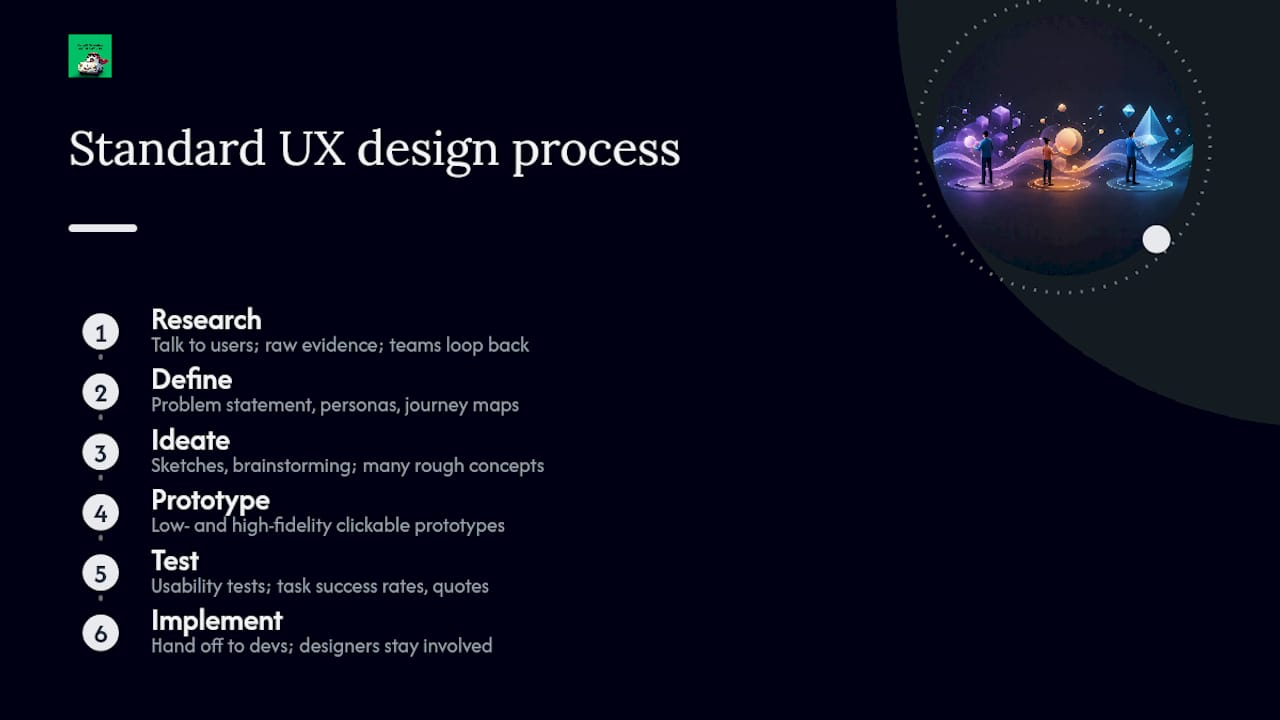
Most UX work follows six stages: research, define, ideate, prototype, test, and implement. It's rarely a straight line. Teams loop back to earlier stages constantly, but the sequence gives structure to what would otherwise be chaos.
Research comes first. Designers talk to actual users, review analytics, and study competitors to understand real problems instead of assumed ones. The output here is raw evidence: interview notes, survey results, behavioral data.
Define turns that evidence into a clear problem statement. This stage produces personas (fictional but data-backed user archetypes) and journey maps that show where users get stuck. A well-written problem statement at this stage saves weeks of wasted design work later.
Ideate is where teams generate possible solutions, usually through sketching sessions, brainstorming, or structured workshops like Crazy 8s. The deliverable is a set of rough concepts, not a decision. This stage works best when it's messy and produces more ideas than anyone expects to use.
Prototype turns the strongest concepts into something people can actually click through, from paper sketches to interactive Figma files. Low-fidelity prototypes answer big structural questions cheaply. High-fidelity prototypes test specific interactions closer to what will ship.
Test puts prototypes in front of real users to see what breaks. Usability testing at this stage catches problems while they're still cheap to fix. A test report typically documents task success rates, points of confusion, and direct quotes from participants.
Implement hands the validated design to developers for production. Even here, the process isn't finished. Designers usually stay involved to answer questions and catch details that get lost in translation from prototype to working code.
Timeline varies enormously by scope. A small feature might move through all six stages in a two-week sprint, with lightweight research and a handful of test participants. A larger program, redesigning an entire booking platform, for instance, can take three to six months, with dedicated research phases, multiple rounds of prototyping, and staged rollouts. The stages don't shrink or disappear on bigger projects. They just get deeper. Understanding how journey scheduling works in transport services offers a useful real-world case: research reveals where pilgrims get confused about timing, and the resulting design has to account for prayer schedules, group sizes, and unpredictable traffic, all discovered in that initial research stage.
What Research Methods and Deliverables Do UX Teams Use?
UX research replaces guesswork with evidence, and the right method depends on the question you're trying to answer. According to a Wikipedia overview of UX design, the discipline typically draws on interviews, surveys, field studies, and contextual inquiry, each suited to a different stage of uncertainty.
- User interviews work best early, when you need to understand motivations and pain points in depth. One hour with five real users often reveals more than a thousand survey responses.
- Surveys scale well once you already know what questions to ask and need to confirm a pattern across a larger group.
- Contextual inquiry means watching people use a product in their actual environment, catching problems that never surface in a controlled interview room.
- Usability testing puts a prototype in front of real people and watches where they hesitate, misclick, or give up.
Each method feeds specific deliverables. Interviews and contextual inquiry inform personas and journey maps. Usability tests produce reports with task success rates and specific friction points. Wireframes and prototypes translate research findings into something a developer can actually build.
Tool choice depends on project size. A solo designer validating one screen might sketch in Figma or even paper and run five hallway tests. A larger team managing a multi-year product needs a research repository like Dovetail to keep findings searchable, plus analytics platforms to track behavior at scale after launch. Neither approach is wrong. The lightweight version just doesn't hold up once a team grows past a handful of people who can remember every past finding by heart.
How Does UX Differ From UI, and Who Does What?
UX and UI get used interchangeably, which causes real confusion. UI (user interface) design covers the visual and interactive surface: colors, typography, button states, spacing. UX covers the entire relationship a person has with a product, and UI is one component within that larger discipline, not a separate field running parallel to it. A beautifully designed interface built on a confusing information structure is still bad UX, even with excellent UI.
Product teams typically split responsibilities across a few roles. UX researchers gather evidence about user behavior and needs. UX designers turn that evidence into flows, wireframes, and structure. Interaction designers focus specifically on how individual elements respond to input, animations, transitions, micro interactions. UI designers handle the final visual layer: color, type, iconography. Product managers balance user needs against business goals and technical constraints. Developers build what's been validated, and the best ones flag technical constraints early rather than after a design is finalized.
Smaller teams often collapse several of these roles into one person. The handoff that matters most, regardless of team size, is between design and development: a prototype that looks finished but hasn't accounted for real data, loading states, or error conditions creates friction that shows up only after launch.
What Skills Do You Need, and Is UX an IT Job?
UX design draws on a specific mix of skills that doesn't map cleanly onto traditional software roles:
- Interviewing and synthesizing qualitative research
- Information architecture (organizing content so people find what they need)
- Wireframing and prototyping in tools like Figma
- Clear written and verbal communication for presenting findings to stakeholders
- Basic data literacy to read analytics and interpret test results
Most working UX designers build these through a mix of formal coursework, certificate programs, and hands-on portfolio projects rather than a single degree path. Internships and case study write ups tend to matter more to hiring managers than transcripts, because portfolios show how a person actually thinks through a problem.
Is UX an IT job? Not in the traditional sense. Research from OneSevenTech draws a clear line between UX design and IT or software engineering roles: UX focuses on human behavior, psychology, and interaction effectiveness, while IT handles infrastructure, hardware, and system maintenance. A UX designer might work closely with developers daily, but the skill set and daily work look almost nothing alike.
How Do You Measure Whether UX Is Working?

UX gets measured with a mix of numbers and observed behavior, not gut feeling. Task success rate tracks whether people complete what they set out to do. Time on task shows how long that takes, useful for spotting unnecessary friction. Error rate counts mistakes made along the way. System Usability Scale (SUS) gives a standardized 0 to 100 score from a short questionnaire, letting teams compare usability across different products or versions. Net Promoter Score (NPS) measures whether users would recommend the product, a rougher proxy for overall satisfaction.
Running a basic usability test doesn't require a research team. Recruit five to eight people who match your actual audience, give them realistic tasks, and watch without guiding them. Note where they hesitate, misclick, or ask questions out loud. Patterns across just five sessions usually reveal the majority of major usability problems, which is why teams don't need hundreds of participants to catch the big issues.
For a faster check without recruiting anyone, Nielsen Norman Group's ten usability heuristics work as an expert review checklist: visibility of system status, user control and freedom, consistency, error prevention, and similar rules of thumb. Running a product through that list catches obvious problems before you spend money on formal testing. For transport services specifically, a real-time feedback system turns rider complaints into structured data that reveals exactly where a journey experience breaks down.
How Do You Start Learning UX Design?
A focused 90-day plan gets a beginner from zero to a presentable portfolio piece:
- Weeks 1 to 3: Learn research fundamentals. Read core UX literature, study a handful of case studies, understand personas and journey maps.
- Weeks 4 to 6: Practice wireframing. Redesign an app screen you use daily, focusing on information hierarchy before visuals.
- Weeks 7 to 9: Build a clickable prototype in Figma and run informal usability tests with five friends or family members.
- Weeks 10 to 12: Document the entire process as a portfolio case study, showing the problem, research, iterations, and final outcome.
Trustworthy resources worth bookmarking:
- Nielsen Norman Group's articles for research-backed fundamentals
- Interaction Design Foundation courses for structured, self-paced learning
- Local UX meetups or Slack communities for feedback and mentorship
Portfolios that get interviews show the messy middle, failed prototypes, contradictory test results, decisions reversed, not just polished final screens. Hiring managers want to see how you think, not just what you shipped.
Why Do Standards Like ISO 9241-210 Matter?
A person's perceptions and responses that result from the use or anticipated use of a product, system, or service. That two-part framing, covering both perception and actual use, is why UX can't be reduced to how something looks on launch day.
Designers rely on a small set of trusted sources to stay grounded in evidence rather than trend chasing: Nielsen Norman Group for usability research, the Interaction Design Foundation for structured theory, and Google's design resources for industry-tested practice. Following recognized standards rather than personal preference is what lets a design decision survive a stakeholder asking "why did you do it this way?"
Why UX Is a Trust Problem, Not Just a Design One
I think about UX as a trust mechanism more than a visual discipline. A pilgrim booking a ride to a holy site for the first time isn't evaluating button colors. They're deciding whether to trust a stranger's car with their safety and their schedule. That's why Saudi Sayyah treats driver photos, vehicle details, and real-time tracking as UX features, not add-ons. Each one answers an anxiety before it becomes a complaint. Good UX investment shows up later as fewer support calls and more people who book again without hesitation.
Where Can You Learn More About UX Design?
- Nielsen Norman Group: research-backed articles on usability heuristics and quality attributes.
- Interaction Design Foundation: structured courses covering UX theory and practice.
- Grow with Google: practical, career-focused UX design overviews.
- Dovetail: research repository guidance and UX definitions grounded in practice.
Practitioners ready to go deeper should look at formal certificate programs and hospitality-adjacent case studies, like Wild Foodz's look at hospitality service touchpoints, for cross-industry UX patterns.
Frequently Asked Questions
What does UX design mean in one sentence? UX design means shaping how a person perceives and interacts with a product or service, based on research rather than assumption, to reduce friction and help them complete tasks successfully.
What is the difference between UX and UI? UX covers the entire experience a person has with a product, while UI refers specifically to the visual interface, colors, buttons, layout. UI is one part of UX, not a separate discipline.
What is user-centered design? User-centered design means every decision starts from documented user needs and behavior rather than internal opinion, validated through direct research and testing at each stage.
Is UX design a good career for beginners? Yes, with a structured learning path. A focused 90-day plan covering research, wireframing, prototyping, and portfolio building gives a beginner a credible starting point without a formal degree.
Do you need to code to work in UX design? No. Coding knowledge helps with developer collaboration, but core UX skills, research, information architecture, prototyping, are distinct from programming.
How is UX design measured? Through metrics like task success rate, time on task, error rate, System Usability Scale scores, and Net Promoter Score, combined with direct observation during usability testing.