

Seamless feedback is frictionless, real-time passenger reporting collected during or immediately after a transfer or tour. It uses in-app ratings, SMS, quick tickets, or driver confirmations to record satisfaction, requests, or incidents. The Ministry of Hajj and Umrah, the Nusuk app, and providers like Saudisayyah each offer dedicated channels for this.
Core elements:
- Quick rating: one- to three-tap satisfaction score
- Optional photo attachment: evidence for complaints or safety reports
- Ticket categorization: inquiry, suggestion, or complaint
- Trip metadata: vehicle ID, driver photo, timestamp, GPS coordinates
Key Takeaways
Seamless feedback for pilgrims means short, evidence-backed reports submitted immediately through provider apps or official channels like Nusuk and the Ministry of Hajj and Umrah portal.
| Point | Details |
|---|---|
| Definition | Frictionless, in-trip or post-trip reporting via app, SMS, or driver confirmation with ticket categorization. |
| Always include | Trip ID, timestamp, vehicle or driver details, and a photo to speed up resolution. |
| Channel choice | Use the provider app for quick fixes; escalate to Nusuk or the Ministry for safety or contractual issues. |
| Regulatory scale | Transport authorities conducted — field inspections in Hajj 1447 and handled thousands of direct reports. |
| Saudisayyah | Pre-trip driver photos, real-time tracking, and one-tap in-app ticketing support the full feedback process on every booking. |
Table of Contents
- How seamless feedback works during a trip
- Where pilgrims in Saudi Arabia should send feedback
- What happens after you submit feedback
- How providers and regulators use feedback to improve pilgrim transport
- How Saudisayyah implements seamless feedback in real trips
- How to give useful, actionable feedback
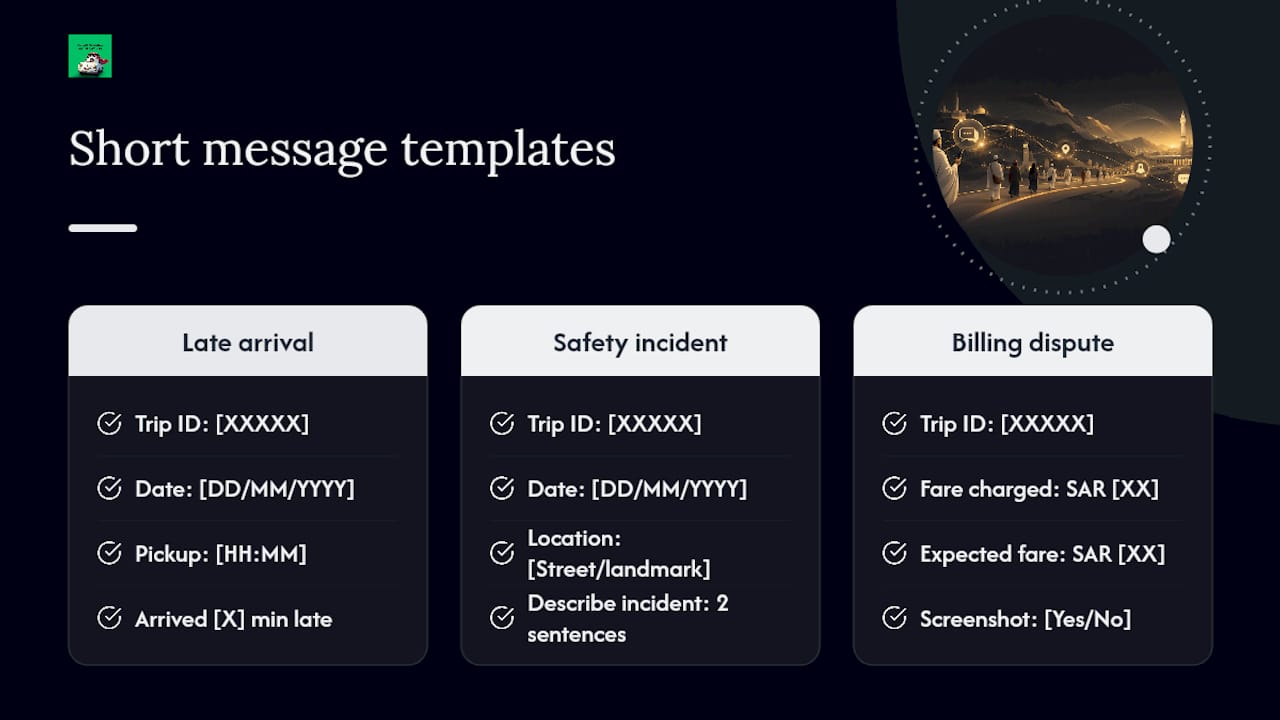
- Short message templates for common ticket scenarios
- Why seamless feedback matters for pilgrims
- Saudisayyah gives you built-in feedback tools on every trip
- Sources
How seamless feedback works during a trip
The process follows five steps:
- Prompt. After pickup or at trip end, the app sends a push notification or SMS. Some providers use a QR code inside the vehicle or a driver-initiated prompt.
- Quick input. Rate the trip in one to three taps, add a short text note, and attach a photo if needed.
- Ticket creation. The system categorizes the report as inquiry, suggestion, or complaint and attaches trip metadata: vehicle ID, driver photo, timestamp, and GPS location.
- Routing. The ticket goes to provider operations. For formal complaints or safety incidents, it routes to the Nusuk app ticketing system or the Ministry portal for official recording.
- Acknowledgment. An in-app confirmation appears immediately with a ticket ID and an expected response window.
Pro Tip: Take a screenshot of the ticket ID the moment it appears. That reference number is required if you need to escalate to the Ministry or Nusuk later.
Where pilgrims in Saudi Arabia should send feedback
Official government channels:
- Nusuk app: Open the Tickets icon, select ticket type (Inquiry, Suggestion, or Complaint), enter a title and details, attach files, and submit. A PDF acknowledgment is available for download.
- Ministry of Hajj and Umrah portal: Log in, select a category, enter details, and submit for official recording and follow-up with status tracking.
Provider channels:
- In-app ticketing or a "Report" button inside the booking platform
- SMS or WhatsApp short reports (where offered by the provider)
- In-vehicle driver confirmation for minor, immediate issues
When to use each channel:
- Minor in-trip issues (late arrival, vehicle cleanliness): report to the provider first for the fastest fix
- Safety incidents or unresolved disputes: file directly with the Ministry or Nusuk for formal escalation
- Regulated transport such as the Haramain or Mashair train: use the operator's in-app channel first, then escalate to the Transport Authority if unresolved
The Unified Model Service Contract requires providers to record pilgrim data and defined service levels, which means formal complaints carry contractual weight when submitted through official channels.
Pro Tip: A reliable data connection is essential for submitting tickets on the move. An eSIM for Saudi Arabia keeps you connected to Nusuk and provider apps throughout the trip without roaming gaps.
What happens after you submit feedback
Immediate confirmation arrives with a ticket ID, a category label, and an expected initial response window. Minor service issues typically receive an initial response within hours; safety incidents are triaged faster and may escalate within the same day.
After confirmation:
- Operational triage: Quick fixes (wrong vehicle type, late arrival) are routed to dispatch for same-day correction. Investigations (driver conduct, billing disputes) are assigned to a case handler.
- Evidence review: Photos, GPS data, and driver details shorten investigation time. For formal escalation to the Ministry, attachments are often required.
- Closure: Expect a closure message with the outcome: an apology, a refund, or a note that driver coaching has been scheduled. If a safety or contractual breach remains unresolved, escalate to Nusuk or the Ministry portal.
How providers and regulators use feedback to improve pilgrim transport
Providers ingest tickets into dispatch and maintenance workflows. A safety alert triggers a real-time flag; a service complaint goes to driver coaching queues. SAPTCO's digital transformation, documented by PwC, shows how cloud ERP systems enable near-real-time ticket routing and faster corrective action when passengers submit evidence-backed reports.

At the regulatory level, the Ministry's expanded satisfaction measurement system collects feedback across Nusuk, field interviews, and mystery shopping, linking results directly to continuous improvement measures across millions of pilgrims.
Hajj 1447 transport monitoring at a glance:
Source: Transport indicators in Hajj 1447
The Vision 2030 Pilgrim Experience Program explicitly targets integrated e-platforms and technology to raise service standards across all stakeholders, which is why feedback submitted through official channels feeds directly into KPI dashboards that influence contracts and service renewals.
How Saudisayyah implements seamless feedback in real trips
Saudisayyah's process starts before the vehicle arrives:
- Pre-trip: Driver photo, vehicle details, and a real-time tracking link are sent before pickup, reducing the chance of issues before the trip begins.
- In-trip reporting: One-tap rating and ticket creation inside the booking interface. Pilgrims can attach photos and flag safety issues directly.
- Operations flow: Tickets route automatically to operations. An internal SLA governs acknowledgment and resolution timelines.
- Fleet and drivers: Latest-model-year vehicles and experienced professional drivers reduce the frequency of complaints at the source.
- Automated booking system: Internationally compliant, with full trip metadata captured at booking and available to support any ticket filed.
Pro Tip: When attaching a photo to a ticket, name the file with your trip ID and the time (e.g., TRP12345-0930). Operations teams can match it to your booking instantly, cutting verification time.
How to give useful, actionable feedback
Always include:
- Trip ID or ticket ID
- Date, time, and pickup location
- Vehicle ID or driver photo reference
- A concise description (two to three sentences)
- Your requested outcome: refund, driver coaching, or safety report
Avoid:
- Vague statements without timestamps ("the driver was bad")
- Long narratives without a clear sequence of events
- Emotional language that obscures the facts
Dos and don'ts:
- Do state the specific time the issue occurred.
- Do attach a photo or screenshot where possible.
- Do name the outcome you want.
- Don't submit without a trip ID — it delays routing.
- Don't combine multiple unrelated issues in one ticket.
Short message templates for common ticket scenarios
Copy and replace the bracketed fields before submitting.
Template 1 — Late arrival (minor service issue):
Trip ID: [XXXXX] | Date: [DD/MM/YYYY] | Pickup time: [HH:MM] Vehicle arrived [X] minutes late. Expected pickup was [HH:MM]. Requested outcome: Acknowledgment and service note on driver record.
Template 2 — Safety incident (driver conduct or seatbelt):
Trip ID: [XXXXX] | Date: [DD/MM/YYYY] | Location: [Street/landmark] [Describe incident in two sentences.] Photo attached: [Yes/No]. Requested outcome: Safety review and formal report.
Template 3 — Billing dispute:
Trip ID: [XXXXX] | Fare charged: SAR [XX] | Expected fare: SAR [XX] Screenshot of charge attached: [Yes/No]. Requested outcome: Refund of SAR [XX] to original payment method.
Paste these into the Nusuk ticket form or your provider's in-app report field. Attach photos or screenshots wherever the form allows. Short, structured messages route faster than long narratives.
Why seamless feedback matters for pilgrims
Quick reporting resolves issues before they compound. A missed pickup corrected in real time is far less disruptive than one that goes unreported until after the trip. Structured, evidence-backed reports also benefit future pilgrims: regulators use aggregated data to set inspection priorities and enforce service contracts.
The simplest action to take right now: save your trip ID the moment your booking is confirmed. That single reference number unlocks every official channel, from provider in-app ticketing to the Ministry portal.
Saudisayyah gives you built-in feedback tools on every trip
Pilgrims who book through Saudisayyah get pre-trip driver photos, vehicle details, and real-time tracking before the car arrives — reducing the conditions that generate complaints in the first place. When an issue does occur, one-tap in-app reporting with photo attachment and automated ticket routing means the report reaches operations without extra steps.
Every booking through Saudisayyah's services and fleet pages includes the full feedback infrastructure described in this guide: automated booking records, GPS metadata, driver confirmation, and an operations SLA. Check available vehicles and routes and book directly to get the integrated experience from pickup to resolution.
Sources
Official government sources:
- My
- Ministry of Hajj and Umrah — EN Legal Guide (Unified Model Service Contract)
- Transport indicators in Hajj 1447 — Saudiauto
- Hajj Ministry expands beneficiary satisfaction measurement system for Hajj 1447 AH — Saudi Arabia News Network
Regulatory and program references: