
A mobile passcode is the single most important control protecting your bookings, payments, and identity on a travel smartphone. Set a strong passcode before you travel. Layer biometrics for convenience, but never as a replacement.
Immediate actions before your trip:
- Set a long numeric or alphanumeric passcode on your iOS or Android device
- Enable Find My (iPhone) or Find My Device (Android) for remote lock and wipe
- Confirm that payment apps and booking apps require biometrics or a passcode for every transaction
Before you board any vehicle, confirm:
- Driver photo and vehicle details received from your transport provider
- Booking reference saved in a second location (email, printed copy)
- Emergency contact registered with your transport provider
Pro Tip: On iOS, go to Settings > Face ID & Passcode and select "Custom Alphanumeric Code" for the strongest protection. On Android, go to Settings > Security > Screen Lock and choose "Password."
Table of Contents
- Why the role of mobile passcodes matters for travelers
- How attackers exploit unlocked devices during travel
- Best practices for passcode and phone security on pilgrimage trips
- How biometrics and passcodes work together
- What to do immediately if your phone is lost or stolen
- What a secure transport platform should do to protect your bookings
- Quick tips for using your phone safely in Saudi Arabia
- Key Takeaways
- Why this guide focuses on passcodes for pilgrims
- Saudisayyah keeps your bookings secure when it matters most
- Useful sources
Why the role of mobile passcodes matters for travelers
Your passcode does more than lock your screen. Apple documents that a passcode entangles with device hardware to derive the encryption keys that protect all stored data. Without it, device encryption is either absent or trivially bypassed.
For travelers, the stakes are higher than at home:
- Banking and payment apps store session tokens that remain active after login
- Booking confirmations contain pickup locations, driver contact numbers, and personal itineraries
- Stored passkeys and OS password managers are only as secure as the device passcode itself — a weak PIN exposes every saved login
- Passport photos and visa documents saved to the camera roll are accessible the moment the screen unlocks
Consumer security guidance is direct: without a passcode, a smartphone is an open gateway for fraudsters to access banking apps and personal data. For a pilgrim managing group pickups, airport transfers, and intercity routes through a single app, that exposure is not abstract.
How attackers exploit unlocked devices during travel
Crowded religious sites and busy transport hubs create specific opportunities for theft and observation. Three scenarios are worth knowing:
- Roadside or crowd theft: A stolen phone with a weak or no passcode gives immediate access to booking apps. Someone with your booking reference can cancel a pickup, redirect a driver, or extract your private meeting location.
- Shoulder surfing: At the Masjid al-Haram or a busy airport gate, an observer can record your PIN as you type. Short, predictable codes are the first target. AI-driven tools can rapidly test common PIN structures and patterns, making date-based or repeated-digit codes unsafe.
- SIM swap and social engineering: An attacker with physical access to your unlocked phone can authorize a SIM swap by responding to carrier verification messages, then use that number to reset passwords for email and booking accounts.
Simple four-digit PINs like 1234, 0000, or birth years are the first combinations tested. A longer passcode raises the cost of every attack type significantly.
Best practices for passcode and phone security on pilgrimage trips
Strong mobile passcode security starts before you leave home. Follow these steps in order:
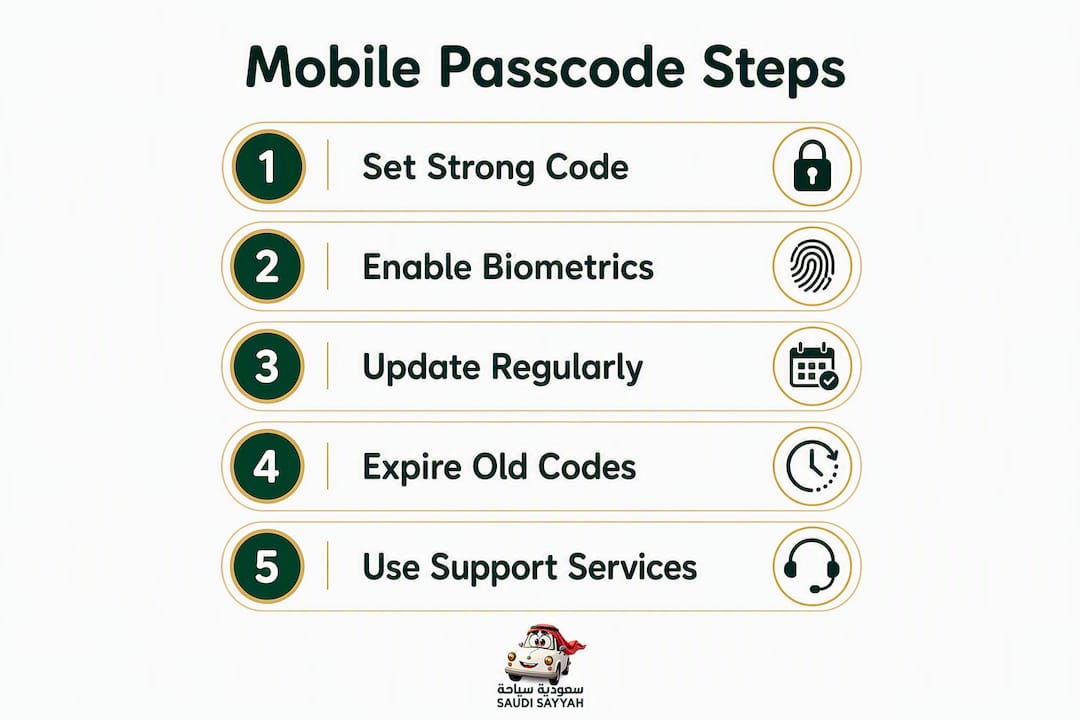
- Replace your default PIN. Switch from a 4-digit PIN to an 8–10 digit numeric code or a full alphanumeric password. Apple notes that a six-character alphanumeric passcode takes more than five and a half years to exhaust all combinations under device protections.
- Set a short auto-lock timeout. One to two minutes is appropriate for travel. Longer timeouts leave your screen exposed in crowded spaces.
- Enable escalating delays and erase-after-10-failed-attempts. Apple's Data Protection ties these features to the passcode; activating them deters brute-force attempts on a stolen device.
- Use a dedicated travel passcode. Choose a code different from your everyday PIN. If someone observed your home-screen unlock at any point before travel, a new code removes that risk.
- Enable two-step verification for your email, booking accounts, and banking apps before departure.
Additional configuration steps:
- Use app-specific authentication (Face ID or fingerprint) for payment and booking apps, in addition to the device passcode
- Store travel documents in an encrypted cloud service or a dedicated password manager, not unencrypted on the home screen
- Register a backup contact number with your transport provider before the trip, in case your primary device becomes unavailable
Pro Tip: After changing your passcode on iOS 17 or later, go to Settings > Face ID & Passcode and tap "Expire Previous Passcode Immediately." The old code otherwise remains usable as a recovery option for 72 hours.
For more on smart travel tools that complement these security steps, Saudisayyah's travel resource covers device and app preparation for pilgrims.
How biometrics and passcodes work together
Biometrics — Face ID, Touch ID, Android fingerprint unlock — improve speed and convenience. They do not replace a strong passcode. Operating systems treat the device passcode as the fallback master key: after a restart, after five failed biometric attempts, or after 48 hours without a biometric unlock, the device requires the passcode. Security researchers note that biometrics should always be paired with a strong passcode because the passcode is the effective fallback that unlocks the device keychain and all stored credentials.
Practical rules for travelers:
- Use Face ID or fingerprint for routine unlocks in private settings
- Require passcode re-entry for high-value actions: payment authorizations, booking changes, and account password resets
- Never rely on biometrics alone in crowded or unfamiliar environments where coercion or observation is possible
Pro Tip: On iPhone, you can temporarily disable Face ID by pressing and holding the side button and a volume button simultaneously. This forces passcode entry — useful if you feel your device may be accessed under pressure.
What to do immediately if your phone is lost or stolen
Act in this order. Speed limits exposure:
- Locate or lock the device. Use Find My (iCloud.com or another Apple device) or Find My Device (android.com/find) to lock the screen remotely or trigger a sound.
- Remotely sign out of accounts. Change passwords for email, booking apps, and banking from a second device or computer.
- Suspend payment cards. Contact your card issuer to freeze or cancel cards linked to Apple Pay, Google Pay, or stored in booking apps.
- Contact your transport provider. Give Saudisayyah your booking reference, a new contact number, and request a driver hold or booking reissue. Consumer guidance confirms that notifying service providers immediately is a critical step to protect active reservations.
- Report to local authorities. In Saudi Arabia, contact the nearest police station or use the Absher platform for official reporting.
Pro Tip: On iOS 17+, if you changed your passcode recently, expire the previous passcode immediately in Settings > Face ID & Passcode. This removes the 72-hour recovery window that would otherwise let someone use the old code.
What a secure transport platform should do to protect your bookings
Not every booking platform handles security the same way. Before you trust a provider with your travel details, confirm these features are in place:
- Encrypted storage of booking data and personal information
- Multi-factor authentication for account changes and password resets
- Pre-trip driver photos and vehicle details sent to your phone before departure
- Geolocation-based real-time tracking during the trip
- A direct communication channel to customer support for booking changes or emergencies
Saudisayyah's automated booking system covers all of these. Driver photos and vehicle details arrive before every trip. Real-time tracking runs throughout the journey. Customer communication is continuous, not reactive. For group pilgrimages, where coordinating multiple pickups across different arrival times adds complexity, that level of platform transparency matters.
If you lose device access, contact Saudisayyah support with your booking reference. The team can reissue booking codes, send SMS confirmations to an alternate number, and place a temporary hold on active trips while you regain account access.
Quick tips for using your phone safely in Saudi Arabia
Before departure:
- Back up travel documents to an encrypted cloud service or password manager
- Register a backup contact number and alternate email with your transport provider
- Download offline maps for key routes in case connectivity is limited near holy sites
During the trip:
- Keep your phone on your person; do not leave it unattended in vehicles or at prayer areas
- Authenticate discreetly in public; shield the screen when entering a passcode
- Confirm driver photo and vehicle details from the Saudisayyah app before boarding any vehicle — experienced drivers and verified vehicles are a core part of the platform's safety model
If you need to hand your phone to someone temporarily:
- Use Android's Guest Mode or iOS's Guided Access to restrict access to a single app
- Lock sensitive apps individually before handing the device over
Key Takeaways
A strong device passcode is the technical foundation for encryption, biometric security, and booking protection — everything else depends on it.
| Point | Details |
|---|---|
| Passcode enables encryption | Apple ties device encryption keys directly to the passcode; no passcode means no real data protection. |
| Longer codes resist attacks | A six-character alphanumeric passcode would take more than five and one-half years to try all combinations under device protections, according to Apple. |
| Biometrics need a strong fallback | The device passcode is the master key for Face ID and fingerprint unlock; a weak PIN undermines both. |
| Act fast if device is lost | Lock remotely, change passwords, suspend payment cards, and contact your transport provider immediately. |
| Saudisayyah adds platform-side protection | Pre-trip driver photos, real-time tracking, and continuous support let you reissue bookings if device access is lost. |
Why this guide focuses on passcodes for pilgrims
Most security guides treat passcodes as a generic consumer topic. For pilgrims and international tourists managing premium transport in Saudi Arabia, the risk profile is different. A single phone holds booking confirmations, payment credentials, group pickup details, and real-time driver communication. Losing access to that device mid-trip is not an inconvenience — it disrupts time-sensitive logistics in an unfamiliar country.
The balance between convenience and security is real. Biometrics make sense for routine unlocks. But the passcode underneath them is what actually protects the data. A platform like Saudisayyah can reissue a booking code and send confirmations to an alternate number. It cannot recover a compromised bank account or a leaked passport photo. That part is the traveler's responsibility, and it starts with a strong passcode set before departure.
Saudisayyah keeps your bookings secure when it matters most
Your device security and your transport provider's platform security work together. Saudisayyah's automated booking system sends driver photos and vehicle details before every trip, runs real-time geolocation tracking throughout, and maintains direct customer communication so you are never without support.
If you lose phone access mid-trip, contact Saudisayyah support with your booking reference. The team reissues codes, sends confirmations to an alternate number, and holds active bookings while you recover access. Review the full range of transfer and tour options before your trip, confirm your backup contact in your account, and check fleet and vehicle details so you know exactly what to look for when your driver arrives.
Useful sources
- Passcodes and passwords — Apple Support: Apple's technical documentation on how passcodes supply entropy for device encryption keys and enable Data Protection features including escalating delays and erase-after-10-failed-attempts.
- Set a unique device passcode or password — Apple Support: Explains the iOS 17+ behavior that allows a previous passcode to remain active for 72 hours and how to expire it immediately.
- New iPhone And Android Warning — Do Not Use These PIN Numbers — Forbes: Reports on AI-driven tools that rapidly test common PIN patterns and identifies number sequences to avoid.
- How safe is your Android PIN code? — McAfee: Security researcher commentary on biometric fallback behavior and why the device passcode remains the effective master key.
- Your strong passwords mean nothing if your phone PIN is four digits — MakeUseOf: Practical explanation of why OS password managers and passkeys are only as secure as the device passcode protecting them.
- The Importance of Having a Passcode on Your Mobile Phone — American Federal Bank: Consumer-focused primer on identity theft risks and the importance of notifying service providers immediately after device loss.