
TL;DR:
- Electronic check-out automates departure by finalizing payments and sending digital receipts before travelers leave. It relies on pre-authorization, correct folio reviews, and updated payment methods to ensure smooth, contactless settlement. If failures occur, support can handle manual settlement with booking references and card details.
Electronic check-out is the automated finalization of your trip folio and the charging of your pre-authorized payment method so you can depart without stopping at a desk. For Saudisayyah customers, this means your card is settled, your receipt is delivered digitally, and your driver details are confirmed before you leave.
What electronic check-out covers for your trip:
- Automated settlement of your booking balance using a pre-authorized Visa, Mastercard, or American Express card
- Folio delivery via mobile app, email link, kiosk, or messaging (WhatsApp, SMS)
- Digital receipt sent to your email or in-app inbox
- Confirmation from Saudisayyah of driver details, vehicle info, and real-time tracking before departure
The automated travel for Umrah approach Saudisayyah uses is built around this contactless model. Systems like Oracle OPERA Cloud support scheduled and mass-settlement workflows that make this possible at scale.
Table of Contents
- How does electronic check-out actually work?
- Are you eligible for automated settlement?
- What happens if electronic check-out fails?
- How Saudisayyah handles electronic check-out for pilgrims
- Is electronic check-out secure for U.S. travelers?
- Key Takeaways
- Why contactless departures matter for pilgrims
- Book or manage your Saudisayyah trip with contactless check-out
How does electronic check-out actually work?
Express check-out eliminates front-desk queues by pre-authorizing payment at booking and delivering a pre-departure folio for review, often during night-audit hours. Here is the full flow:
- Pre-authorization at booking. Your card is held for the estimated trip total. Visa, Mastercard, and American Express each handle holds differently, but the hold reserves funds without charging them.
- Pre-departure folio delivery. The system compiles your charges. In hospitality contexts, this typically happens between 2:00 and 5:00 AM during the night audit. For Saudisayyah, folio confirmation arrives before your scheduled departure.
- Automated settlement. Once you confirm or the settlement window closes, the system charges the pre-authorized card and closes the booking.
- Receipt delivery. A digital receipt goes to your email or in-app inbox automatically.
Delivery channels and how each one works:
| Channel | How you confirm | Typical timing |
|---|---|---|
| Mobile app | Tap to approve folio in-app | Before departure window |
| Email link | Click link, review, confirm | Night audit or pre-departure |
| Kiosk | On-screen review and tap | On-site, any hour |
| Messaging (WhatsApp/SMS) | Reply or tap link in message | Sent before departure |
Pro Tip: Check that your card's available balance covers the full trip total before your departure window opens. The pre-authorization amount set at booking may not account for add-ons, and a gap between the hold and the final balance is the most common reason automated settlement fails.
Are you eligible for automated settlement?
Automated settlement requires your card to have sufficient authorization to cover the full balance. If the final total exceeds the pre-authorized amount, or if your account has direct-billing restrictions, the system will not process and manual check-out is required.
Pre-departure checklist:
- Confirm your payment card has enough available credit to cover the full booking total
- Review your pre-departure folio for any unexpected charges
- Update your payment method in the app or contact Saudisayyah support if your card has changed
- Confirm whether your vehicle requires a physical key return or is keyless
Unexpected incidentals added after booking — such as a route change, extra stops, or extended hire time — can push your final total above the pre-authorized amount and trigger a manual settlement requirement. Review your folio as soon as it arrives.
Pro Tip: Review your folio the moment it arrives in your inbox or app. Once automated settlement posts, disputing a charge takes longer than catching it before the system runs.
What happens if electronic check-out fails?
Most failures come from insufficient card authorization or a final folio that exceeds the pre-authorized amount. Incidentals like extra stops, extended hire, or route changes are the most common cause.
Common failure reasons:
- Card balance below the final trip total
- Direct-billing or corporate account restrictions
- Network or app error during settlement
- Charge flagged by your card issuer
Recovery steps:
- Check your pre-departure folio immediately for the specific charge causing the block.
- Update your payment method in the Saudisayyah app or call support directly.
- Request staff-assisted manual settlement if the in-app update does not resolve it.
- Obtain a written receipt or digital invoice before you leave.
In most cases, a driver or remote agent can finalize settlement without you returning to a physical desk. Card holds that do not convert to charges are typically released within 3–7 business days, depending on your card issuer.
What to have ready when you contact support:
- Booking reference number
- Last four digits of your payment card
- Driver name and vehicle details (sent by Saudisayyah before your trip)
- Screenshot of any error message in the app
How Saudisayyah handles electronic check-out for pilgrims
Saudisayyah's digital concierge platform sends driver photo, vehicle details, and a real-time tracking link before every trip. This information also supports remote settlement confirmation so you do not need to be at a desk to finalize your booking.
What Saudisayyah provides before and during departure:
- Driver photo and full vehicle details
- Real-time geolocation tracking link
- Pre-departure folio or settlement confirmation (delivered digitally)
- Digital receipt to your email or in-app inbox
Accepted payment methods: Visa, Mastercard, and American Express cards on file. To update your payment method, use the in-app payment settings before your trip or contact Saudisayyah support directly.
For vehicle return, Saudisayyah's fleet includes keyless options. Key-card return policies vary by property and vehicle type; confirm at booking to avoid an unnecessary trip to a desk.
Saudisayyah's cloud-based booking system supports scheduled and automated settlement workflows, which means your folio can be prepared and delivered before you are even ready to depart.
Support contact: Reach Saudisayyah via in-app chat or the website contact page. Have your booking reference and card details ready.
Pro Tip: Use the driver tracking link Saudisayyah sends before your trip to confirm the correct vehicle and driver. If you need to request remote settlement, this information is what the support team will use to locate and close your booking.

Is electronic check-out secure for U.S. travelers?
Pre-authorization holds are not charges. Visa, Mastercard, and American Express each place a temporary hold on your card at booking; the actual charge posts only when settlement runs. If settlement does not occur, the hold releases automatically, typically within 3–7 business days.
Security practices to expect:
- Card-on-file handling with encrypted transmission
- Tokenization of stored card data (your full card number is not stored in plain text)
- Digital receipts delivered via secured email or in-app inbox
- No biometric data collected during the electronic check-out process
Safe behaviors for U.S. travelers:
- Use a card with sufficient available credit, not a debit card with a low daily limit
- Update card information only through the official Saudisayyah app or website
- Verify your receipt after settlement and keep a screenshot until your bank posts the final charge
- For smart travel security, avoid entering payment details over public Wi-Fi
Pro Tip: If you see a charge you do not recognize after settlement, report it to Saudisayyah support first. Most discrepancies are resolved faster through the booking system than through a card dispute, which can take weeks.
Key Takeaways
Electronic check-out works when your card holds sufficient authorization, your folio is accurate, and your payment method is current before the settlement window opens.
| Point | Details |
|---|---|
| Pre-authorization is required | Your card must cover the full trip total; a gap between the hold and final balance blocks automated settlement. |
| Review your folio early | Folios arrive before departure; disputing a charge after settlement posts takes longer than catching it first. |
| Update payment before departure | Change your card on file in the Saudisayyah app or contact support before your trip window opens. |
| Failure has a clear recovery path | Update payment in-app, request remote settlement, then obtain a digital receipt before leaving. |
| Saudisayyah supports contactless departure | Driver details, real-time tracking, and digital receipts are sent automatically to support remote settlement. |
Why contactless departures matter for pilgrims
For pilgrims completing Umrah or a religious tour, the last thing needed at departure is a queue at a desk. Electronic check-out removes that friction entirely when the conditions are right. The technology is not new, but the way Saudisayyah applies it — sending driver details, vehicle info, and tracking before the trip even starts — means settlement can happen remotely, without anyone needing to be in the same place at the same time.
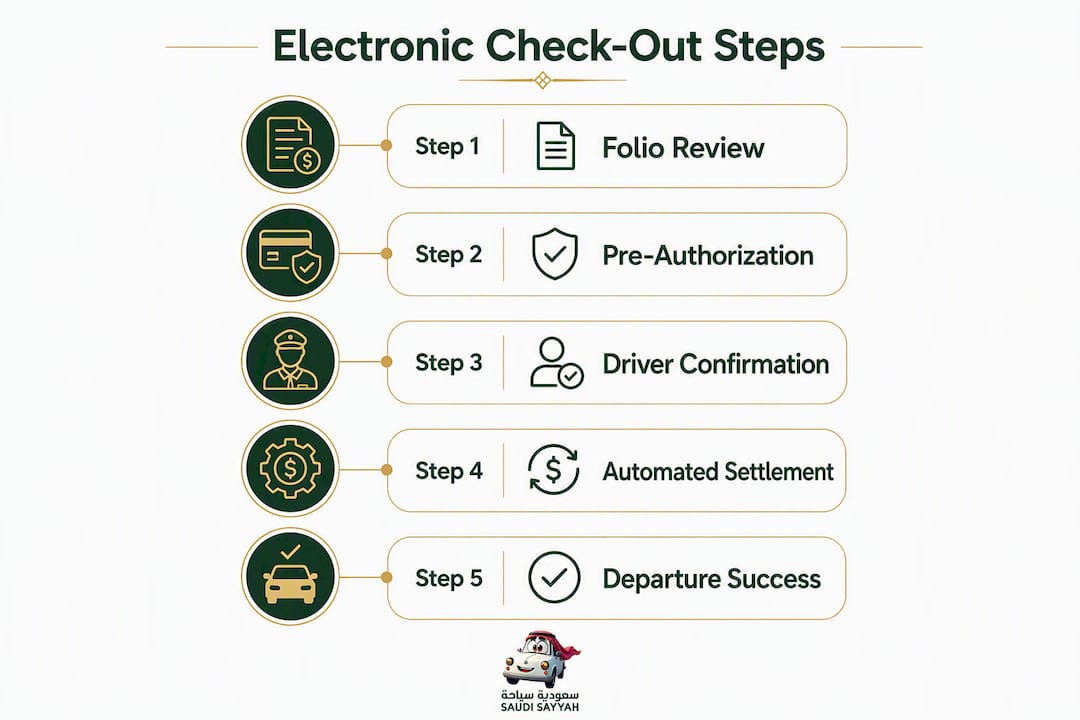
The one thing most guides understate: the folio review step is where the whole system either works or breaks down. Automated settlement is reliable when the folio is clean and the card is ready. When it is not, the recovery is straightforward, but only if you have your booking reference and card details at hand. Pilgrims who prepare those two things before departure almost never need to visit a desk.
Book or manage your Saudisayyah trip with contactless check-out
Saudisayyah gives pilgrims and tourists a fixed-rate, fully contactless departure: your driver details arrive before the trip, your folio is delivered digitally, and settlement runs automatically on your pre-authorized card.
Before your trip, confirm your payment card is current and covers the full booking total. You can update your card on file directly through the Saudisayyah services page or review vehicle and driver standards on the fleet page. For last-minute check-out issues, contact Saudisayyah support via in-app chat or the website contact form with your booking reference ready.